

 模板
模板 教程
教程 环境
环境 性能
性能 功能
功能 管理
管理


软件自动化测试—代码覆盖率
在中提到了代码覆盖率,我很久没有去书店了,不知道是不是出了新的版本,觉得书里面关于代码覆盖率方面的知识有些地方没有讲,在这里补充一下。先回顾一下如何
查看代码覆盖率
创建一个C#工程WildChar(无所谓是类型库工程还是命令行程序工程),假设我们要写一个将字符串按单词成对反转的程序。将下面的代码贴到工程的一个cs文件中:
Program.cs
public static string ReverseStringPair(string input)

{

    if (string.IsNullOrEmpty(input))

        throw new ArgumentNullException("input");
    char[] result = new char[input.Length];
    int resultIter = 0;
    ReverseStringPairImp(input, 0, result, resultIter);
    return new string(result);
}
private static void ReverseStringPairImp(string input, int inputIter, char[] result, int resultIter)
{
    // skip white space
    while (inputIter < input.Length && input[inputIter] == ' ') inputIter++;
    int[] indics = new int[2] {
        inputIter, // first word begin index,
        0 // second word begin index
    };
    for (; inputIter < input.Length; ++inputIter)
    {
        if (input[inputIter] == ' ')
       {
            if (indics[1] == 0)
                indics[1] = -1;
            else if (indics[1] > 0)
                break;
        }
        else if (input[inputIter] != ' ' && indics[1] == -1)
            indics[1] = inputIter;
    }
    // copy second word, inputIter points to the end of second word
    if (indics[1] > 0)
    {
        for (int i = indics[1]; i < inputIter; ++i)
            result[resultIter++] = input[i];
        indics[1]--;
        // copy white space
        while (indics[1] >= 0 && input[indics[1]] == ' ')
            indics[1]--;
        result[resultIter++] = ' ';
    }
    else
        indics[1] = input.Length - 1;
    // copy the first word
    for (int i = indics[0]; i <= indics[1]; ++i)
       result[resultIter++] = input[i];
    // next pair
    if (inputIter < input.Length)
    {
        result[resultIter++] = ' ';
        ReverseStringPairImp(input, inputIter, result, resultIter);
    }
}
|
把鼠标放在ReverseStringPair函数的声明上(或者说第一行),点击右键,并且选择“创建单元测试”命令,一切按照默认的设置选择“确定”按钮,创建一个测试工程。
在新创建的测试工程自动添加的programtest.cs(因为类名叫做program)文件里,添加一个新测试用例:
Programtest.cs
 [TestMethod()]

public void ReverseStringPairTest()

{

    string input = "ab cd ef gh";
    string expected = "cd ab gh ef";
    string actual = Program.ReverseStringPair(input);
    Assert.AreEqual(expected, actual);
}
|
单元测试用例创建好了以后,点击工具栏里面的“Run Tests in Current Context”,就能看到测试结果了,如下图所示:

启用代码覆盖率测试
只执行单元测试是不能检查代码覆盖情况的—即你创建的测试用例总共覆盖了多少行源代码。为什么需要特意开启代码覆盖率测试是有原因的,这个在文章的最后会讲到。
1. 在“解决方案浏览器(Solution Explorer)”里,双击“localtestrun.testrunconfig”文件。
2. 在弹出的“localtestrun.testrunconfig”窗口里,双击“代码覆盖率(Code Coverage)”。
3. 里面会列出好几个文件,有.dll ,也会有.exe。勾选你要测试代码覆盖率的程序,比如说你要测试WildChar工程—也就是我们的产品代码的代码覆盖率,请勾选 WildChar.exe。不要勾选包含测试用例的那个dll文件,因为我们对测试代码本身的覆盖率没有任何兴趣。结果如下图所示:
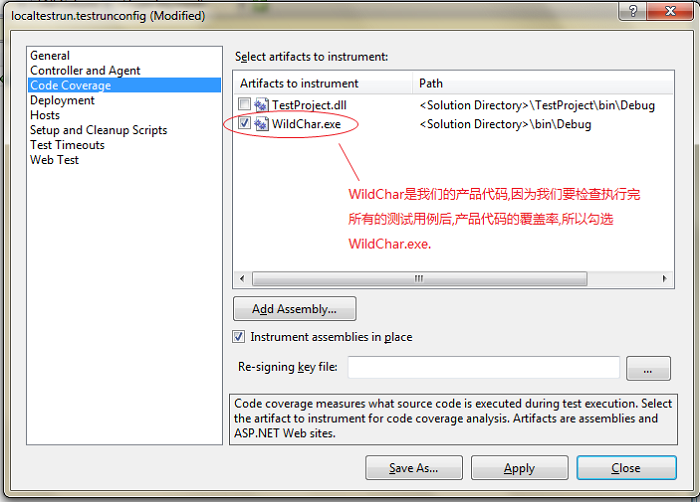
4. 点击“应用(Apply)”关闭窗口。
在重新运行一下所有的测试用例,点击测试结果窗口工具栏最右边的按钮,查看代码覆盖率情况,如下图所示:
原文转自:http://www.uml.org.cn/Test/201306262.asp


