如何实现对 as400 db2 的追加 移植

发表于:2007-05-26来源:作者:点击数: 标签:
怎么实现对as400DB2中 数据库 的追加移植 另一台机器是装了NT的DB2 DB2MOVE和DB2LOOK对400的DB2还能用么 我这儿是用不了:( 还有什么别的方法吗? xuguopeng 回复于:2004-10-21 09:39:44 什么叫追加移植?? 但是我知道NT的DB2和400的DB2区别很大。。。。

怎么 实现 对 as 400 DB2 中 数据库的追加移植
另一台机器是 装了 NT的 DB2

DB2MOVE 和 DB2LOOK 对400的DB2 还能用么
我这儿是用不了:(
还有什么别的方法吗?

 xuguopeng 回复于:2004-10-21 09:39:44
什么叫追加移植??

但是我知道NT的DB2和400的DB2区别很大。。。。。

 qingzhou 回复于:2004-10-21 13:15:26
我也觉得对“追加移植”这句话感到很模糊。
楼主是想通过DB2企业版(或个人版)访问DB2 for OS/400后实现从DB2 for NT往DB2 for OS/400推数据?还是其它?

 angeleyes 回复于:2004-10-24 16:39:50
嗯,是我没说清。
  应该是,将400上的db2中的数据库所有内容 移植到 nt db2 上
  然后,nt 再根据400上的情况
  将数据变动,时实追加过来 。

  我还不会,请大家指点一下。  :D

 realqsecofr 回复于:2004-10-24 19:47:16
[quote:2ed74ef526="angeleyes"]嗯,是我没说清。
  应该是,将400上的db2中的数据库所有内容 移植到 nt db2 上
  然后,nt 再根据400上的情况
  将数据变动,时实追加过来 。

  我还不会,请大家指点一下。  :D[/quote:2ed74ef526]

移植用IXF
实时 双向 同步 
DB2/400 <-> DB2 UDB  Oracle Sybase SQL Server 
这个给我打电话 我这里有现成的产品 价格公道哦

 qingzhou 回复于:2004-10-25 11:08:00
上周末我趁有时间时在本地环境测试了一下,实现UDB→DB2之间成功访问,然后你自行研究一下UDB中的”DB2 Query Patroller”功能或者其它基于UDB中捆绑了SQL功能的组件,看看如何通过UDB端的操作来操纵OS/400 DB2数据库。

======================================================================================

[b:4714350afa]★本地环境:[/b:4714350afa]
IBM AS/400 V5R2M0
IBM DB2 Universal Database V7.2 for Win2k & WinXP
IBM DB2 Connection

[b:4714350afa]★操作步骤:[/b:4714350afa]

1.Config Local AS/400 ip address:

                       [code:1:4714350afa]Change TCP/IP Interface (CHGTCPIFC)                      
                                                                                
 Type choices, press Enter.                                                     
                                                                                
 Internet address . . . . . . . . > '172.31.193.111'                            
 Line description . . . . . . . .   ETHLINE       Name, *SAME, *VIRTUALIP...    
 Subnet mask  . . . . . . . . . .   '255.255.255.0'                             
 Associated local interface . . .   '*NONE'                                     
 Type of service  . . . . . . . .   *NORMAL       *SAME, *MINDELAY...           
 Maximum transmission unit  . . .   *LIND         576-16388, *SAME, *LIND       
 Autostart  . . . . . . . . . . .   *YES          *SAME, *YES, *NO              
 PVC logical channel identifier     *SAME         001-FFF, *SAME, *NONE         
                + for more values                                               
 X.25 idle circuit timeout  . . .   *SAME         1-600, *SAME                  
 X.25 maximum virtual circuits  .   *SAME         0-64, *SAME                   
 X.25 DDN interface . . . . . . .   *SAME         *SAME, *YES, *NO              
 TRLAN bit sequencing . . . . . .   *SAME         *SAME, *MSB, *LSB             


                                                                         Bottom 
 F3=Exit   F4=Prompt   F5=Refresh   F12=Cancel   F13=How to use this display    
 F24=More keys                                                                  
 Function key not allowed.                     [/code:1:4714350afa]
2.Activate ip address:

                          [code:1:4714350afa]Work with TCP/IP Interfaces                           
                                                             System:   S65F6F8B 
 Type options, press Enter.                                                     
   1=Add   2=Change   4=Remove   5=Display   9=Start   10=End                   
                                                                                
      Internet         Subnet              Line      Line                       
 Opt  Address          Mask             Description  Type                       
                                                                                
      127.0.0.1        255.0.0.0        *LOOPBACK    *NONE                      
 9    172.31.193.111   255.255.255.0    ETHLINE      *ELAN                      


                                                                         Bottom 
 F3=Exit      F5=Refresh   F6=Print list   F11=Display interface status         
 F12=Cancel   F17=Top      F18=Bottom          [/code:1:4714350afa]                                 
                                                                          

3. If local machine had no RDB directory entry , Please add local database :

                      [code:1:4714350afa]Add RDB Directory Entry (ADDRDBDIRE)                      
                                                                                
 Type choices, press Enter.                                                     
                                                                                
 Relational database  . . . . . .   S65F6F8B                                      
 Remote location:                                                               
   Name or address  . . . . . . .   *LOCAL                                      


   Type . . . . . . . . . . . . .   *IP           *SNA, *IP                     
 Text . . . . . . . . . . . . . .   Test from DB2 connection to UDB v7.2             


                                                                         Bottom 
 F3=Exit   F4=Prompt   F5=Refresh   F12=Cancel   F13=How to use this display    
 F24=More keys                                             [/code:1:4714350afa]                     
                                           

4.Start TCP/IP and *DDM services :

STRTCP
STRTCPSVR SERVER(*DDM)

5.OS/400 command : NETSTAT *CNN , checking Local port:drda、ddm → Status:Listen .

                      [code:1:4714350afa] Work with TCP/IP Connection Status                       
                                                             System:   S65F6F8B 
 Type options, press Enter.                                                     
   3=Enable debug   4=End   5=Display details   6=Disable debug                 
   8=Display jobs                                                               
                                                                                
      Remote           Remote     Local                                         
 Opt  Address          Port       Port       Idle Time  State                   
      *                *          ftp-con >  022:20:59  Listen                  
      *                *          telnet     000:00:45  Listen                  
      *                *          smtp       575:45:53  Listen                  
      *                *          netbios >  815:08:08  Listen                  
      *                *          netbios >  000:00:00  *UDP                    
      *                *          netbios >  000:00:04  *UDP                    
      *                *          netbios >  058:23:45  Listen                  
      *                *          snmp       023:54:42  *UDP                    
      *                *          ldap       815:07:44  Listen                  
      *                *          cifs       000:04:07  Listen                  
      *                *          drda       815:09:24  Listen                  
      *                *          ddm        815:09:24  Listen                  
                                                                        More... 
 F3=Exit   F5=Refresh   F9=Command line   F11=Display byte counts   F12=Cancel  
 F15=Subset   F22=Display entire field    F24=More keys                         [/code:1:4714350afa]                                                                                
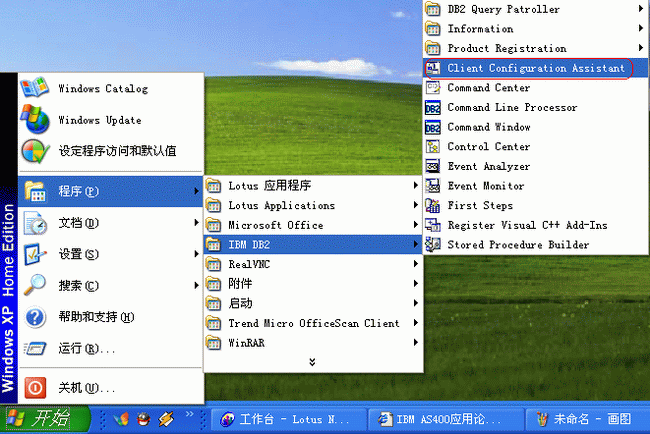
6.Start “Client Configuration Assistant” of UDB : (Picture:Step 6)                                                                             
         
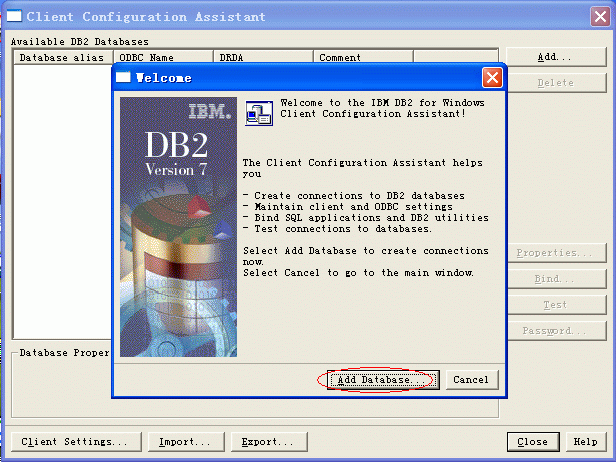
7.Add database :(Picture:Step 7)


Step 6


Step 7


 qingzhou 回复于:2004-10-25 11:11:26
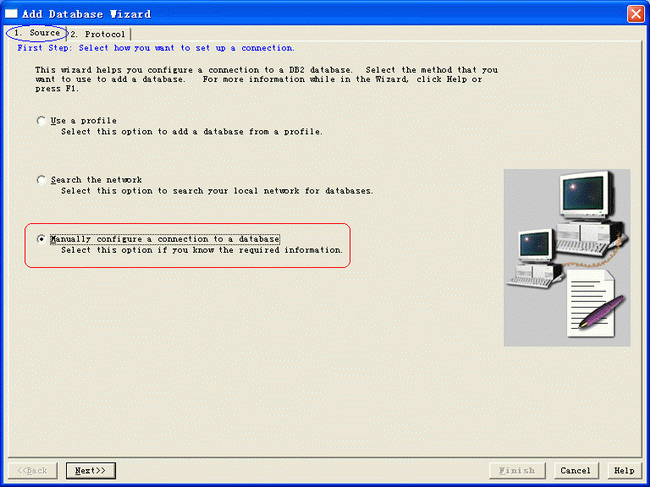
8.Click “1.Source” , select bottom selection :  (Picture:Step 8 )

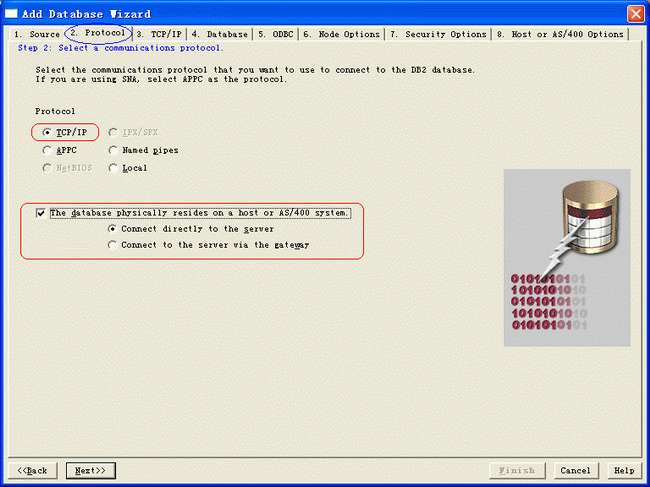
9. Click “2.Protocol” , select “TCP/IP” and bottom selection :(Picture:Step 9)


Step 8


Step 9


 qingzhou 回复于:2004-10-25 11:14:57
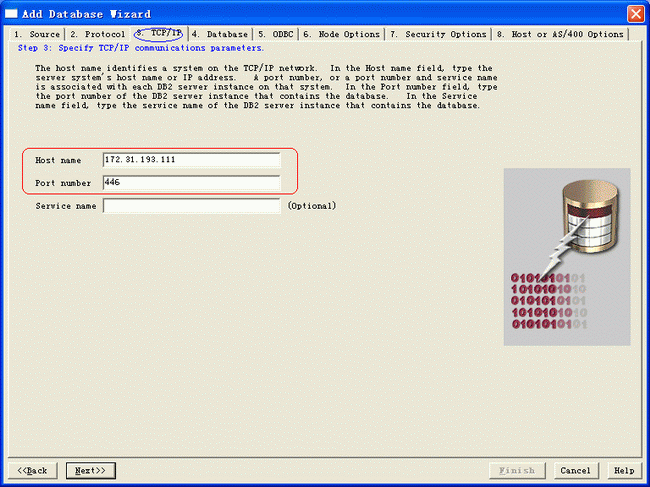
10. Click “3.TCP/IP” , input “Host name” (as/400 ip address or system name), default port is 446 ,please don’t change: (Picture:Step 10)

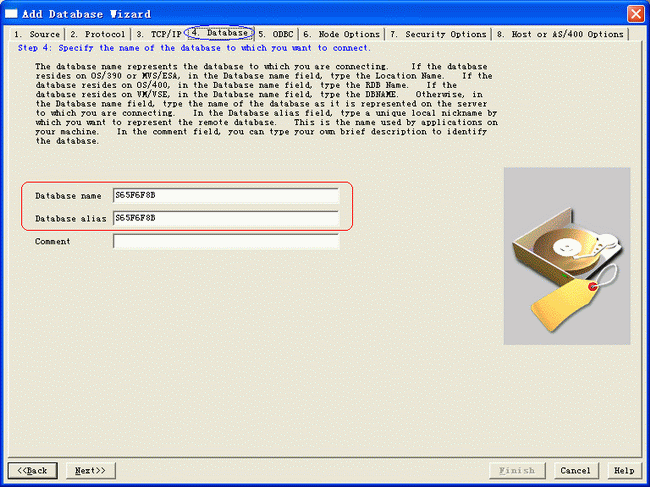
11.Input the database name of last 3 step , the database name of local machine is system name , please check by youself :(Picture:Step 11)


Step 10


Step 11


 qingzhou 回复于:2004-10-25 11:18:48
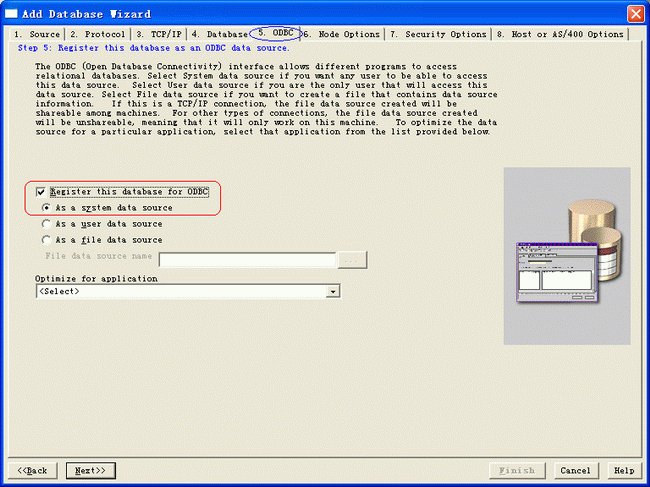
12. Click “5.ODBC” , select “Register this database for ODBC” and “As a system data source” selection :(Picture:Step 12) 

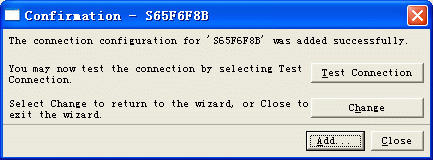
13.Keep other selection default statement (6.Mode Options ,7.Security Option, 8.Most or AS/400 Options) , click “Finish” . And you click “Close” : (Picture:Step 13)


Step 12


Step 13


 qingzhou 回复于:2004-10-25 11:27:42
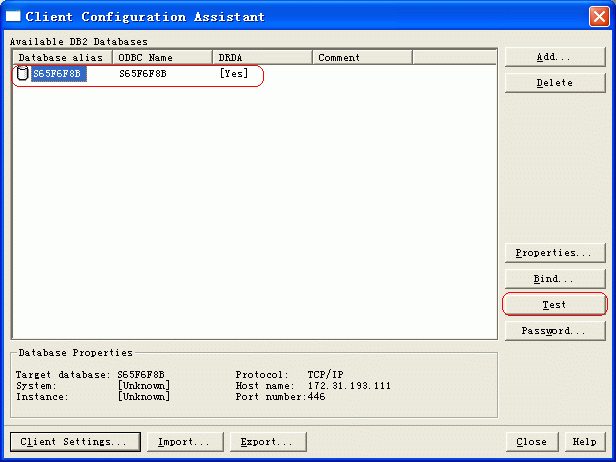
14.From this windows , you can click “Test” to check connection from UDB to DB2 : (Picture:Step 14)

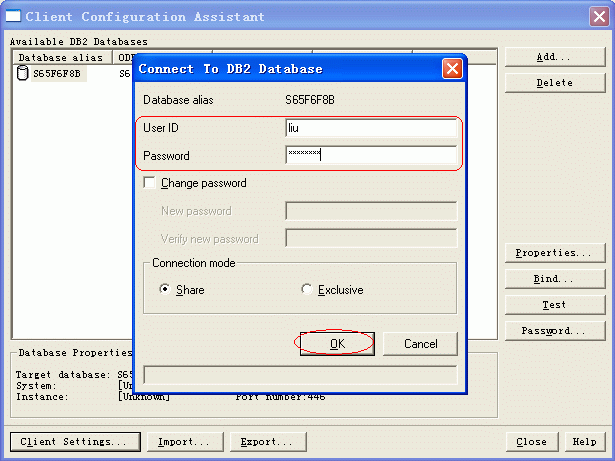
15.Input OS/400 “Login id” and “Password” , OK :(Picture:Step 15)


Step 14


Step 15


 qingzhou 回复于:2004-10-25 11:29:44
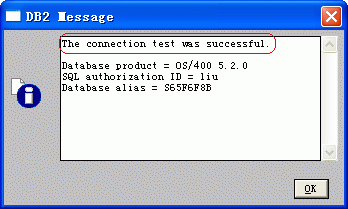
16.The information of notice is “The connection test was suclearcase/" target="_blank" >ccessful”. (Picture:Step 16)


Step 16


原文转自:http://www.ltesting.net