

 模板
模板 教程
教程 环境
环境 性能
性能 功能
功能 管理
管理


eclipse新特性--JFace Data Binding
现在eclipse M4已经出来了,其中一个最cool的非UI特性就是JFace data binding framework. 到现在为止,大量我们可以用到JFace data binding的例子在test包里。 http://wiki.eclipse.org/index.php/JFace_Data_Binding http://wiki.eclipse.org/index.php/JFace_Data_Binding_Scenarios 可以通过CVS很方便的下载到test包: Host: dev.eclipse.org 展开HEAD... 可以先运行检查配置是否正确: 1. 展开 org.eclipse.jface.tests.databinding 如果终端出现一些....然后是测试多少个,具体log等,那就没问题了。 关于JFace data binding framework: 一般的UI都需要自己保存数据,然后向每个text,combo写监听器,然后返回到主程序中,非常繁琐,但是现在因为UI和data的绑定,简单地让人吃惊.... 以我的财务管理程序举例来说,现在我只需要写完数据结构和图形界面,然后在代码里加上下面这样的代码: IDataBindingContext dbc = DataBinding.createContext(composite);
在M5发布的时候JFace binding小组会结束data binding API的开发.
关于JFace data binding framework,在下面的网址可以找到具体的文档.
打开CVS Repositories View,选New-->Repository location
在窗口里依次填入:
Repository path: /home/eclipse
User: anonymous
Password:空白
Connection type: pserver
“org.eclipse.jface.databinding”
“org.eclipse.jface.tests.databinding”
就是代码和测试代码了.
2. 展开 the org.eclipse.jface.tests.databinding package
3. 右击 “BindingTestSuite.java” 并选 “Run as | SWT Application”
dbc.bind(departmentCombo, new Property(depatments, "department"), null);
dbc.bind(projectCombo, new Property(depatments, "project"), null);
dbc.bind(dateText, new Property(depatments, "date), null);
dbc.bind(wareText, new Property(depatments, "ware"), null);
dbc.bind(priceText, new Property(depatments, "price"), null);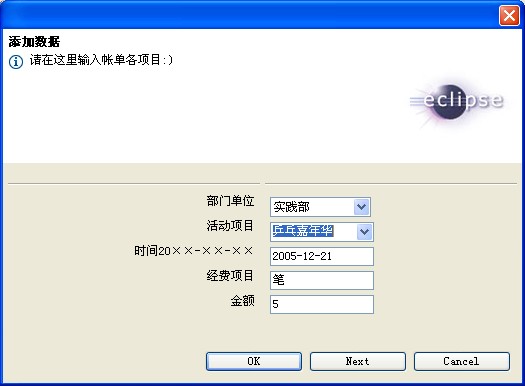
我不需要自己再很多的代码,只需要加上两个方法:
dialog.getDepartments()
dialog.setDepartments(...)
就完全搞定数据在UI和数据结构之间的传输:)


