how to make it display chinese fonts?
i've already set the default asian language as CHINESE simplified, however it just display overlapping rectangular boxes when typing chinese.
so disappointing...
| lcjclj 回复于:2004-01-18 05:11:45 | ||||||||||||||||||||
| I met this problem too. My Linux system is basing on English, I think the problem may come from it. Even StarOffice Suite 7 has the same problem. | ||||||||||||||||||||
| sakulagi 回复于:2004-01-18 08:03:51 | ||||||||||||||||||||
| [quote:e14ff5068b="mauricze"]how to make it display chinese fonts? i've already set the default asian language as CHINESE simplified, however it just display overlapping rectangular boxes when typing chinese. so disappointi..........[/quote:e14ff5068b]OO缺省的字体是英文字体 ,即使 是 中文版也是这样。所以你可以自己改一下当前文档使用的字体,在OOo的工具条上有一个下拉框可以选择字体,如果是redhat改成ZYSong18030 | ||||||||||||||||||||
| mauricze 回复于:2004-01-18 12:04:42 | ||||||||||||||||||||
| yes, by default the program sets ZYSong18030. however, it just shows overlapping blocks. later, i found that under my fedora, it is okay when i choose AR PL KaitiM GB or AR PL SongtiM GB however, the problem is still there when opening html files with OOo; but the problem is solved when i Ctrl A, Ctrl C, and Ctrl V in the Writer and followed with choosing the right font.... i think maybe i should install more fonts; where can i download more chinese fonts and where should i install them? | ||||||||||||||||||||
| sakulagi 回复于:2004-01-18 12:20:17 | ||||||||||||||||||||
| [quote:3dc78f1269]however, the problem is still there when opening html files with OOo; but the problem is solved when i Ctrl A, Ctrl C, and Ctrl V in the Writer and followed with choosing the right font.... [/quote:3dc78f1269]你可以先ctrl+a,然后在改变字体。 | ||||||||||||||||||||
| mauricze 回复于:2004-01-20 21:08:12 | ||||||||||||||||||||
| but i cannot find the font setting option in the html editting tool of OOo. | ||||||||||||||||||||
| sakulagi 回复于:2004-01-21 10:21:02 | ||||||||||||||||||||
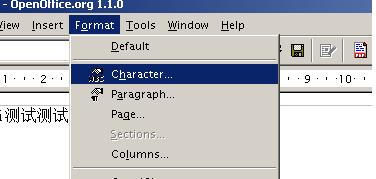
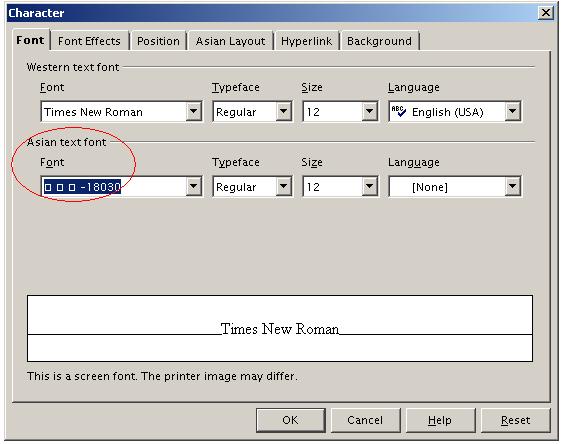
| 看一下示意图。 先看那个菜单的位置,然后在弹出的对话框里选择一下亚洲字体。
| ||||||||||||||||||||
 javascript:window.open(this.src);" style="CURSOR: pointer" onload="return imgzoom(this,550)">